


Miranda Moore
RDA Lead Assistant, Beacon Dentistry
08/27/2026
How to Automate Dental Supply Ordering and Inventory Tracking

~ 9 minutes to read
To automate dental supply ordering and inventory tracking, first get counts and reorder points reliable. Then connect item usage, low-stock alerts, vendor price comparison, purchase orders, and receiving so each step updates the next.
A practice buys inventory software in January. The team loads the item list in a week, sets minimum quantities from what the lead assistant remembers, and switches everything on. By April they are still rush ordering bonding agent on a Thursday afternoon.
The software worked exactly as instructed. It automated the practice’s guesses.
That is the failure nobody in this category will describe to you on a sales call, and it is the reason the order of operations matters more than the tooling. To automate dental supply ordering properly you consolidate, cull, count, label, observe, and only then automate. Practices that invert those steps end up with a faster version of the problem they already had. ZenOne exists to run the automated half of that sequence, and this post is mostly about the unglamorous half that has to come first.
Related resources
- Dental Supply Ordering: How Private Practices Simplify the Process and Save Money
- Who Should Manage Your Inventory? Defining the “Clinical Coordinator” Role
- Dental Clinic Inventory Management Best Practices
Summary
Automating dental supply ordering means closing a seven stage loop: scan out at point of use, keep a live count, fire a reorder at a threshold derived from real usage, price that reorder across every distributor you use, generate and route the purchase order, scan the delivery back in with expiration and lot captured, and roll spend up against the 5 to 6 percent of collections benchmark. The sequence to get there matters more than which software you pick. Consolidate storage, cut duplicate items, take an accurate baseline count, label and scan enable, run in observation mode for a quarter, then set thresholds from the data you collected. Practices that skip the observation quarter set thresholds from memory and automate the exact behavior they were trying to fix.
The Closed Loop: What Automation Actually Means Here
“Automated” gets used loosely in this category, so it is worth being specific about what the finished system does without anyone thinking about it.
The seven stages. Consumption is scanned out at the moment of use. The on hand count updates live. The count crosses a threshold and fires an alert. The reorder is priced across every connected distributor. A purchase order is generated and routed. The delivery is scanned back in with expiration and lot captured. Spend rolls up against a benchmark, and observed usage feeds back into the threshold for next time.
This is a loop, not a checklist. Break any single link and the stages downstream degrade quietly rather than failing loudly, which is the dangerous part. A backordered item the system believes arrived is a stockout with no warning attached to it.
What most practices buy instead. Marketplaces cover buying but never see consumption. General inventory apps cover tracking but connect to no supplier. Owning both is not the same as having a loop, because the manual handoff between them is precisely where the data goes stale.
What an Automated Dental Office Ordering System Should Do
A dental office ordering system should connect stock counts to reorder alerts, compare supplier prices, route purchase orders, and confirm receiving. If one of those steps still lives in a separate spreadsheet or inbox, staff still have to reconcile the process by hand.
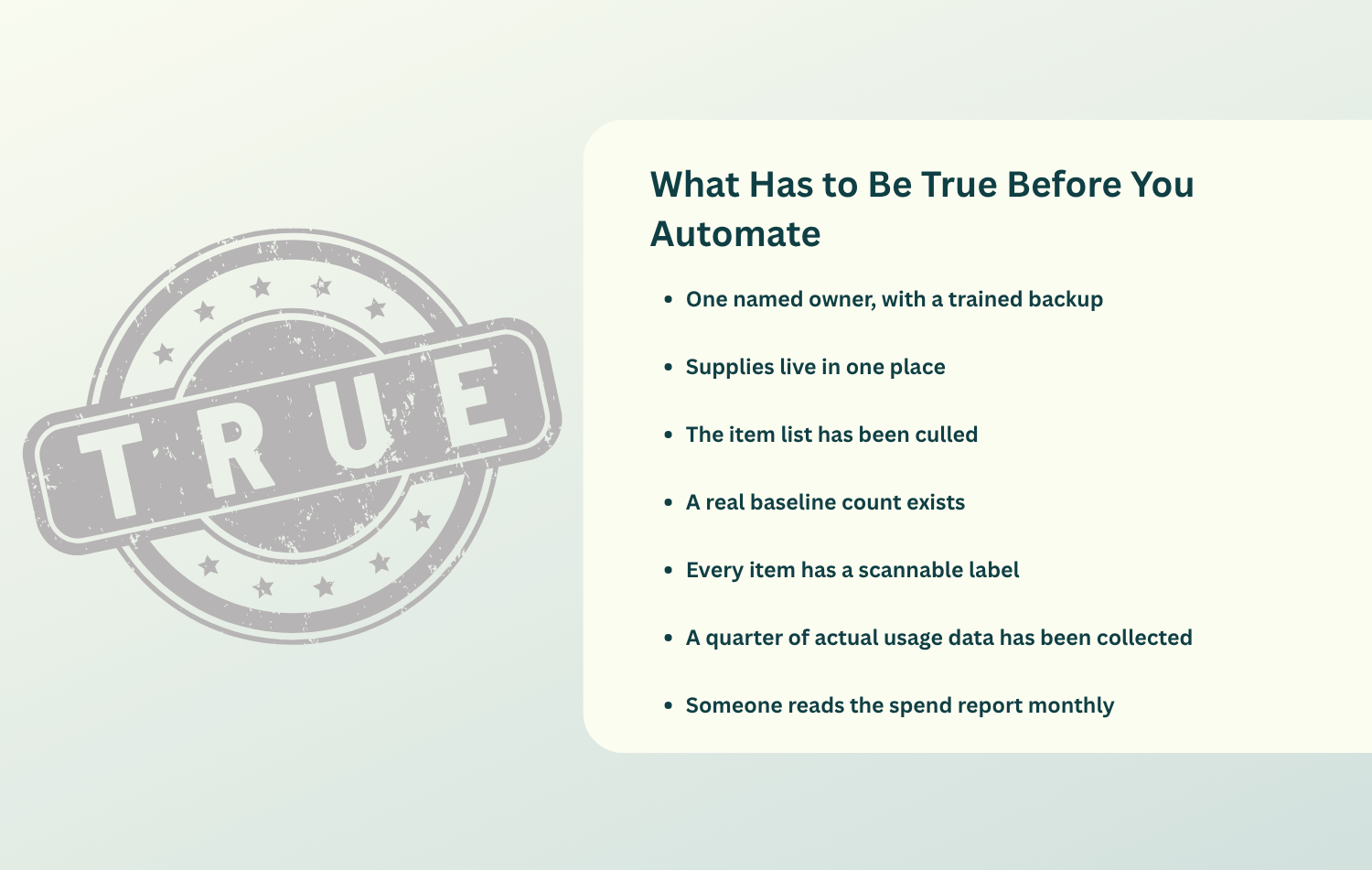
What Has to Be True Before You Automate
Automation amplifies whatever it finds. These are the conditions that decide whether it amplifies a system or a guess.
- One named owner, with a trained backup. Usually the office manager, clinical coordinator, or lead assistant.
- Supplies live in one place. Stock spread across three operatories and a closet cannot be counted accurately, and cannot be rotated at all.
- The item list has been culled. Six hundred items on a list nobody maintains is worse than 200 items somebody does.
- A real baseline count exists. Two people, a blocked schedule, expiration and lot captured as you go.
- Every item has a scannable label. Including the ones that arrive without one.
- A quarter of actual usage data has been collected. This is the step everyone skips and the one that decides the outcome.
- Someone reads the spend report monthly. Ten minutes, owner and doctor, first of the month.
If your process is ready but you still need to choose a platform, compare the best dental inventory software options for 2026 before you set up the workflow.
Close the loop instead of buying half of it
Ordering and inventory in one system is what turns two tools into a loop. Book a Demo with ZenOne.
Before the Software: Owner, Storage, Count
Name one owner first. The ADA’s inventory control guidance calls for a staff member who manages this part of the practice plus at least one other person trained as a backup, and it is direct about the reason: supply management is often one of the easiest targets for fraud and abuse, because most dentists are too busy to fully monitor what is being used, what is being ordered, and what is going out the door.
Spread the roles without spreading the ownership. The California Dental Association recommends involving multiple staff members in monitoring and documenting the system as a fraud control. The workable compromise in a small practice is one owner for ordering, a different person receiving deliveries, and the doctor reviewing spend monthly.
Consolidate storage before you count anything. Supplies scattered across operatories, a closet, and sterilization make an accurate baseline impossible, and disorganized storage physically hides expiration dates behind newer boxes.
Cull the item list before you import it. Standardize the non clinical half only. Gloves, barriers, and bibs are a purchasing decision. Bonding agents and composites belong to the doctors, and forcing standardization there buys you a compliance war and a private stash in operatory three. The CDA’s bib example is the shape of the win: one box plus a backup is $100 in inventory, and four extra colors with their own backups is $500, which is $400 of cash sitting still.
Then take one real baseline count. Two people, schedule blocked, expiration and lot recorded. Finding three months of one item and none of another is the return on the exercise, not a sign that you did it wrong.
Setting It Up: Label, Observe, Then Set Thresholds
Label and scan enable
Generate codes, print shelf labels, and code the items that arrive unlabeled. A phone camera costs nothing to start with, and a dedicated scanner runs $30 to $50 if the team prefers one.
The reason scanning matters this much is that typed entry does not hold up under a real schedule. In a CDC study published in Applied Clinical Informatics, scanned product identifiers came through at 99.999 percent accuracy in a clinic pilot, and a separate analysis of 50 million manually entered vaccine records found 53 percent of the product codes missing or inaccurate. Attach the scan to an existing motion, at the moment the item leaves the shelf, or it will be the first thing dropped on a heavy day.
Run in observation mode for a full quarter
This is the most skipped step in the entire rollout and the single biggest cause of automation that never works. Order the way you always have, but scan everything.
You are buying data during these weeks, not efficiency. What you are watching for is consumption rate per item, actual supplier lead times as opposed to quoted ones, and which specific items produced a rush order.
Then set thresholds from the data
Reorder threshold equals average daily usage times supplier lead time in days, plus a safety buffer sized to the variability you actually observed rather than the worst case you can imagine. Aim for four to six inventory turns a year, which works out to roughly 60 to 90 days of supply on hand, according to Pearl.
If a practice will not wait a quarter, and plenty will not, set conservative thresholds, label them provisional, and put the reset on the calendar for day 90. A provisional number with a review date is a system. A remembered number with no review date is the thing you were trying to escape.
Making It Pay: Comparison, Receiving, Monthly Review
Add price comparison at the point of reorder. The platform prices the item across every connected supplier before anything is purchased. This step comes seventh rather than first because comparison only pays once you know what you actually buy and how much of it.
Compare total cost, not unit price. Writing in Dental Economics, Daniel Gordon makes the point that the cheapest option is not always the best, because the real cost of a purchase includes shipping, the hours spent shopping and tracking shipments, and the risk of receiving factory seconds. Free shipping minimums and lead time belong in that calculation too.
Close the loop at receiving. Scan the delivery against the open purchase order instead of tossing the packing slip in the recycling. That single habit catches substitutions, short shipments, silent backorders, and invoices that do not match the quote, and it is the only moment when lot numbers and expiration dates can realistically enter the system.
Review spend monthly and count on a cycle. The ADA caps supplies and inventory at 5 to 6 percent of collections and recommends no single month exceed 6 percent of the prior month’s collections. Count a rotating subset of items every month rather than running one annual audit in a panic.
Watch carrying cost while you are at it. Holding inventory costs roughly 20 to 30 percent of its value per year according to NetSuite, so $40,000 sitting on your shelves is costing $8,000 to $12,000 annually in cash you cannot use.
Price comparison at the moment it matters
Every reorder priced across Henry Schein, Patterson, Benco, Darby, and the rest, against 200,000 normalized SKUs. See how it works.
A Realistic Timeline
Say this part plainly to your team before you start: month one feels like more work, because it is. The payback arrives when a quarter of real usage data replaces a month of guesses.
| Phase | When | What you do | What you get |
|---|---|---|---|
| Groundwork | Weeks 1 to 2 | Name the owner and backup, consolidate storage, cull the item list, take the baseline count, apply labels | A count you can trust and a list worth maintaining |
| Observation | Weeks 3 to 12 | Order the old way, scan everything, use provisional thresholds only | Real consumption rates and real lead times |
| Calibration | Day 90 | Reset every threshold from observed usage and observed lead times | A system that is accurate, not just running |
| Payoff | Quarter 2 | Price comparison in full effect, first clean read on spend against collections, first quarterly threshold review | Rush orders stop, and the spend number starts moving |
This is a sequence, not a benchmark. A practice that hits day 90 with clean data is further ahead than one that switched everything on in week two and has been quietly wrong since.
The Five Failure Modes That Break Automation
None of these are software problems. Every one is a sequencing or ownership problem that the software then executes faithfully.
| Failure mode | What it looks like in month four | The fix |
|---|---|---|
| Bad baseline count | Confident automated orders for the wrong quantities | Consolidate storage first, count with the schedule blocked, two people |
| Thresholds set from memory | The same rush orders as before, now automated | Observe for a quarter, then derive from usage and lead time |
| Set and forget | Accurate in January, wrong by August | Calendar a 90 day recalculation and actually hold it |
| Nobody scanning | An expensive spreadsheet with a login screen | Attach the scan to an existing motion, check adoption weekly for the first month |
| Nobody reads the reports | Supply creep discovered at year end | Ten minutes on the first of the month, owner and doctor together |
The one to watch hardest is the fourth. Scan discipline is the load bearing habit, because live counts, reorder alerts, forecasting, and spend reporting all inherit their accuracy from it. If the team has stopped scanning by month three, nothing downstream is real.
How ZenOne Closes the Loop
- Barcode and QR check in and check out for live counts, with reorder alerts that fire on threshold rather than on someone noticing an empty box on a Tuesday.
- Every reorder priced across your existing distributors, including Henry Schein, Patterson, Benco, and Darby, matched against more than 200,000 normalized SKUs so you compare true equivalents.
- Ordering and inventory in one system, which is what makes the loop a loop instead of two tools with a manual handoff, with spend reporting tied to the collections benchmark.
- Your distributors stay yours. ZenOne routes each order to the best price rather than replacing the vendor relationship you have spent years building.
- A structured way to do the groundwork. The dental inventory makeover exists because the consolidate, cull, and count phase is where most practices stall.
- Proof from practices that finished the sequence. Dr. Nikki recovered a full day a month that had been going into ordering. Dr. Jack Fan’s assistants now handle ordering entirely, and the practice is no longer tied to a single distributor. More of those are on the customer wall.
Common Questions About Automating Dental Inventory
How long before automated ordering is actually accurate? Ninety days, realistically. The software runs on day one, but the thresholds driving it are only as good as the usage data behind them, and one quarter is the minimum honest sample.
Can we skip the observation period if we are busy? You can, and many practices do. Set conservative thresholds, label them provisional, and calendar the day 90 reset. What you cannot do is set thresholds from memory and never revisit them, because that is the number one reason automation fails.
Who should own dental inventory tracking? One named person, usually the office manager, clinical coordinator, or lead dental assistant, with a trained backup. The ADA recommends exactly that structure, and the backup is not optional.
Does automation mean we lose our distributor relationships? Only if you buy a platform that requires it. Comparison based ordering needs multiple distributors connected, so keeping your existing reps is a feature of the model rather than an exception to it.
How often should thresholds be recalculated? Every 90 days. Case mix moves, lead times drift, and a threshold set once is a guess with a longer shelf life.
Run the Loop, Then Review the Data
The practices that succeed at this are not the ones that bought the best software. They are the ones that counted properly before they automated anything. Consolidate, cull, count, label, observe, then automate, and what you end up with reflects what your practice actually consumes rather than what someone remembered on a Tuesday.
ZenOne is dentist owned, and the reason founder Tiger Safarov built it around collective volume is that a private practice should not have to join a group to buy like one. The day the reorder for the anesthetic fires without anybody noticing the box was low is the day the system is real.
Live counts, reorder alerts, and price comparison in one system
Stop running ordering in one tool and tracking in another, and let the loop close itself. Book a Demo with ZenOne.
Join 1400+ dental professionals, shop from your favorite
suppliers, compare prices instantly, and save over $17,000/year
Try our platform free for 14 days.
Get the latest ZenOne updates and product launches in your inbox
Don't miss the latest news!
Receive exclusive offers and news straight to your inbox!
Continue reading
10/02/2026
~ 7 minutes to read
09/23/2026
~ 7 minutes to read

09/11/2026
~ 7 minutes to read
Let's discover how we can help you

Tiger Safarov
Hi, I'm Tiger, the CEO at ZenOne, and I'm happy to personally ensure your success with ZenOne. Send me your latest invoice or a statement for a Free Savings Analysis.
Ask me a question:

