


Miranda Moore
RDA Lead Assistant, Beacon Dentistry
07/27/2026
Switching From Dental Spreadsheets to Software: A Practical Guide for Private Practices

~ 7 minutes to read
Switching from dental spreadsheets to software usually starts with one bad Friday: you reach for a critical item, the shelf is empty, and the sheet that was supposed to warn you was last updated two weeks ago. So you pay for overnight shipping, again. If that sounds familiar, your spreadsheet is not the problem so much as a system that has quietly stopped keeping up with your practice. A good dental inventory management process comes first, and software is what makes that process fast and repeatable.
The goal here is not to shame the humble spreadsheet. It is to help you see when a spreadsheet is still the right tool, when it has become a liability, and exactly how to move your ordering and inventory into software without disrupting the way your team already buys. At ZenOne, we work with private practices making this exact transition every week, and the switch is usually smaller than people fear.
Summary
Spreadsheets are fine for a single-chair office with a short supply list and one person updating them. They break down once you add locations, line items, and team members, because everything depends on manual updates that no one has time to make. This guide covers the signs you have outgrown the spreadsheet, the hidden costs of staying on it, how to clean up your process first, a step-by-step way to move into dental inventory software, and what to look for so the tool you pick actually saves time instead of adding work.
See what the switch looks like side by side
If you want a quick before-and-after, our ZenOne vs. spreadsheet comparison lays out the difference feature by feature. Start your free 14-day trial whenever you want to test it with your own supply list.
Signs Your Practice Has Outgrown the Spreadsheet
A spreadsheet is a general-purpose tool. It handles simple lists and manual logs well, and it costs nothing to start. The trouble is that it never tells you when it has stopped working. You just feel the friction pile up.
A useful rule of thumb: if you carry more than 150 line items, run two or more locations, or spend an hour a week fixing broken formulas and version conflicts, you have outgrown manual tracking. Add the moments where two people edit different copies, where no alert warns you that anesthetic is about to run out, and where comparing three suppliers means opening ten browser tabs, and the pattern is clear.
There is also a quiet reliability problem. Research from the University of Hawaii’s Raymond Panko found that roughly 88% of audited spreadsheets contain errors, and that the people who build them are wildly overconfident: developers estimated an 18% chance of an error when the real rate was closer to 86%. In a practice where a mistyped reorder threshold can mean a stockout mid-procedure, that gap matters.
What the Spreadsheet Is Quietly Costing You
The sticker price of a spreadsheet is zero, which is exactly why the real costs stay hidden. They show up as labor, waste, and overspend that you only notice after the month has closed.
The pattern repeats in most offices: shipping turns a good price into a bad one, the same items get reordered because no one saw them in stock, you run out mid-week and pay rush fees, and you overbuy to feel safe so cash sits on a shelf. None of these are visible in a static sheet until it is too late to act.
Supply costs are one of the most controllable lines in a practice, and they are under pressure. Prices for dental equipment and supplies have climbed in recent quarters, according to the ADA Health Policy Institute, whose quarterly State of the U.S. Dental Economy tracking describes a fiscal squeeze as reimbursement fails to keep pace. Most advisors put clinical supplies in the range of 5% to 6% of collections, with anything above 8% a red flag. A spreadsheet cannot tell you where you land on that scale in real time. Software can.
Know your number before month-end
ZenOne shows spend against budget as it happens, not after the fact. Start a free 14-day trial and see your true supply spend in one place.
Fix the Process Before You Buy the Software
Here is the part most software pitches skip: a tool will not save a broken process, it will only make the mess move faster. Clean up the fundamentals first, then let software carry the weight.
Start with a master supply list. Write down every item your team uses, where it is stored, and how many you want on hand. Then set a reorder point for each one so ordering stops being a guess. The math is simple: reorder point equals average daily use multiplied by lead time in days, plus a safety buffer. Our full guide to managing dental inventory walks through this step by step and includes a free inventory list template you can start on paper today.
Layer in a light counting rhythm on top of that list. Count your most critical, fast-moving items weekly, moderate items monthly, and bulk disposables quarterly. Once that habit exists, importing it into software is straightforward, because you already know your items, your thresholds, and your true monthly spend.
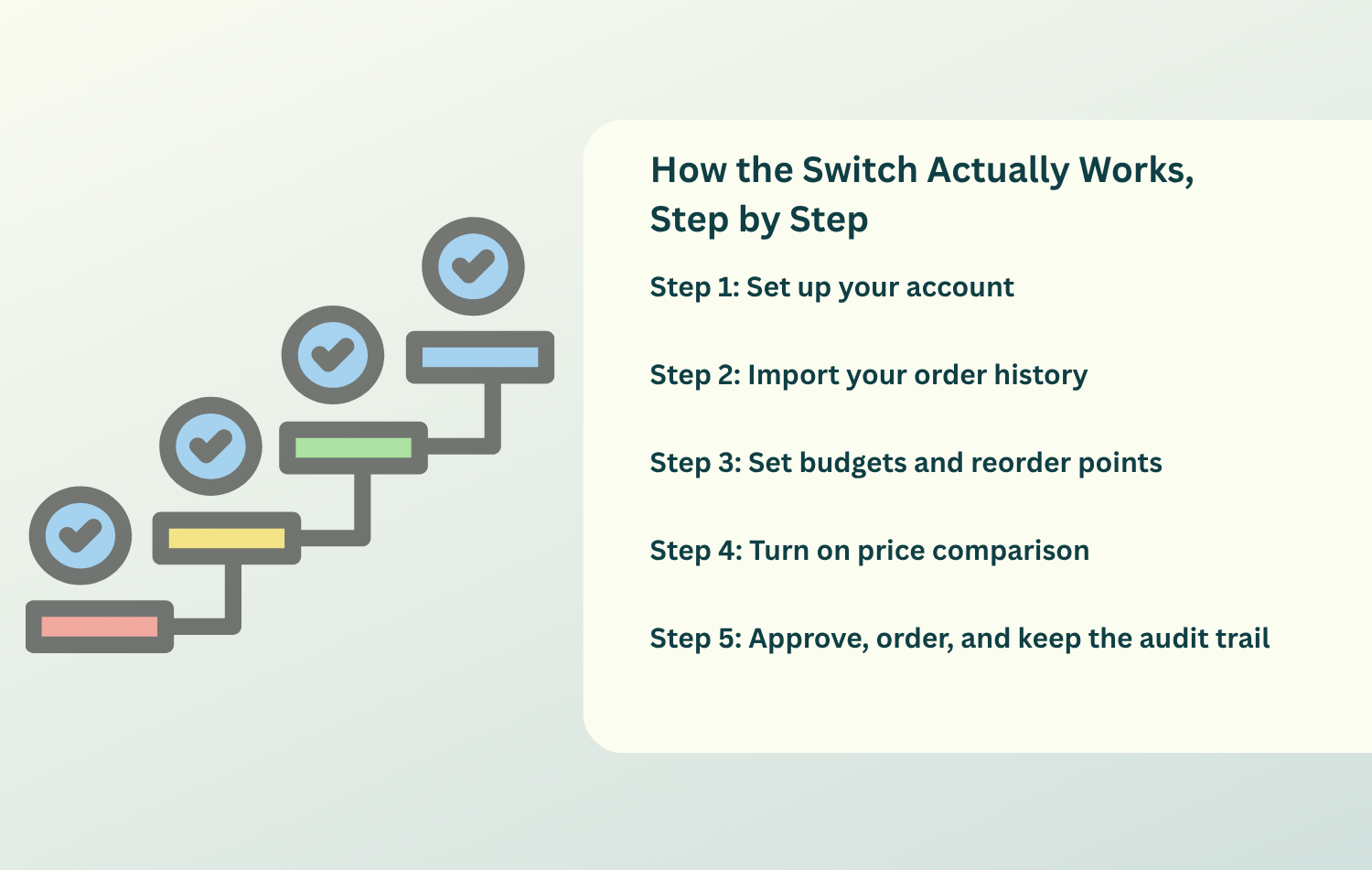
How the Switch Actually Works, Step by Step
This is where practices get nervous, and where the reality is reassuring. Moving into dental inventory software is closer to setting up a new email account than to a system migration. Here is the workflow ZenOne uses, which mirrors the process above.
Step 1: Set up your account
Have your dental license ready, connect your main distributor, and add a payment method. Most practices finish this in seven to fifteen minutes, and no training is required to place a first order.
Step 2: Import your order history
Rather than retyping your catalog, bring in your past orders. The system pulls in SKUs, prices, and units so your item list is populated for you. If your history lives in a spreadsheet, a CSV import moves it over in one step.
Step 3: Set budgets and reorder points
Set a monthly budget, invite your team, and cap who can order over it. A common starting point is around 4% of last month’s collections, adjusted to your own case mix. Enter the reorder points you defined earlier so the system flags items before they run out instead of after.
Step 4: Turn on price comparison
This is where the savings live. Instead of checking each supplier by hand, you see prices side by side and order the same trusted products at the lowest available cost. You keep your existing reps and distributors: the software adds visibility on top of the relationships you already have.
Step 5: Approve, order, and keep the audit trail
One click sends purchase orders, logs who did what, and keeps a timestamped record. That trail is not busywork. When a manufacturer issues a recall, you can trace a lot number in seconds rather than digging through binders, which matters given how quickly FDA medical device recalls can move.
A switch you can finish this week
You do not have to overhaul everything at once. Begin your free 14-day trial, import one supplier, and see value before your coffee gets cold.
What to Look for in Dental Inventory Software
Not every tool that calls itself inventory software will actually reduce your work. Use this short checklist when you evaluate options, whether you look at ZenOne or anyone else.
A strong system should give you a central item catalog you can import, live on-hand tracking you can update from a phone or tablet, and reliable low-stock and expiry alerts. It should compare prices across multiple suppliers, because that is where real savings happen, and it should support order approvals and user roles so the right people order the right things.
Two features matter more than they first appear. The first is a tamper-resistant audit trail that records who received, counted, and ordered each item, which protects you during inspections and recalls. The second is proper handling of expiring and hazardous materials: your storage room runs on expiry dates and the safety data sheets that OSHA’s Hazard Communication Standard requires you to keep on hand. If a tool cannot show you an item’s expiry or its SDS in a couple of clicks, keep shopping. Ask for a short trial using five real items and your real vendors, and if it takes more than fifteen minutes to see value, it is too complex.

Bringing Your Team Along
Software succeeds or fails at the human layer. The best platform in the world will drift back toward chaos if no one owns it, so build a light structure around the switch.
Name a single inventory lead who owns counts and orders, with a backup for vacations. Record a thirty-minute onboarding once, covering how to scan items in and out, where things are stored, and how reorder points work, then reuse the recording for every new hire. Post a QR code on the supply closet door that links to your “how to receive an order” steps, so the answer is always within reach.
Then keep it alive with rhythm and recognition. A five-minute Monday huddle to clear any count variances catches most errors before they compound, and a small monthly reward for the operatory with zero stockouts does more for accuracy than any amount of nagging. Habits, not heroics, keep the data clean.
Three Myths About Leaving the Spreadsheet Behind
A few beliefs keep practices stuck on a system they have already outgrown. Here is why each one tends not to hold up.
The first myth is that software is harder than a spreadsheet. In practice, setup runs seven to fifteen minutes and requires no training, while the spreadsheet’s difficulty is hidden in the hours of manual upkeep you have simply gotten used to. The second myth is that you will have to switch suppliers. You will not: you keep your reps and distributors and use the software to verify pricing and standardize ordering on top of them. The third myth is that it is not worth it for a small office. When most five-chair practices save around $17,000 a year and the platform starts at $49 a month, the return shows up quickly, and ZenOne even refunds the fee in any month it does not save you more than it costs.
Conclusion
Switching from dental spreadsheets to software is less about buying a tool and more about giving your team back the hours they currently spend patching a system that was never built for a busy practice. Get the process right first: a master list, clear reorder points, and a simple counting rhythm. Then let software handle the grunt work of live counts, price comparison, one-click ordering, and a clean audit trail, so running low, overbuying, and month-end surprises stop being routine.
That is exactly what ZenOne was built to do for private practices. Founded by CEO Tiger Safarov and trusted by more than 1,400 dental practices, it keeps your suppliers, your reps, and your workflow intact while adding the visibility a spreadsheet can never provide. If the sticky notes and tabs have stopped keeping up, the move is simpler than you think.
Ready to retire the spreadsheet?
See whether live counts, real-time price comparison, and one-click ordering fit your practice. Start your free 14-day trial of ZenOne, no contract and cancel anytime.
Join 1400+ dental professionals, shop from your favorite
suppliers, compare prices instantly, and save over $17,000/year
Try our platform free for 14 days.
Get the latest ZenOne updates and product launches in your inbox
Don't miss the latest news!
Receive exclusive offers and news straight to your inbox!
Continue reading

07/06/2026
~ 6 minutes to read
07/03/2026
~ 7 minutes to read

07/01/2026
~ 7 minutes to read
Let's discover how we can help you

Tiger Safarov
Hi, I'm Tiger, the CEO at ZenOne, and I'm happy to personally ensure your success with ZenOne. Send me your latest invoice or a statement for a Free Savings Analysis.
Ask me a question:

